Outlook was trying to send out messages from Outbox though the Outbox was empty.
It's not a virus, but a stuck read receipt. For some reason, the SMTP server won't accept it but Outlook keeps trying to send it. Read receipts are stored as hidden messages in the mailbox and you'll either need to configure Outlook to use a SMTP server that will accept the receipts or delete them using MFCMAPI.
MFCMAPI is actually a tool for Outlook MAPI developers but as it provides “low-level” access to Outlook’s data stores, it is also a handy tool for some advanced troubleshooting.
However, make sure you follow the instructions below very closely to prevent making any irreparable mistakes.
- Visit the MFCMAPI page on GitHub to download the latest version of MFCMAPI.
- When you use a 32-bit version of Outlook, you’ll need the file starting with;
MFCMAPI.exe - When you use a 64-bit version of Outlook, you’ll need the file starting with;
MFCMAPI.exe.x64
- When you use a 32-bit version of Outlook, you’ll need the file starting with;
- Extract the downloaded file and run
mfcmapi.exefrom within the extracted folder. - Press OK on the first screen which displays some usage notes.
- Choose: Session-> Logon…
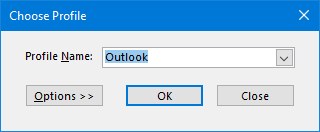
- Select your Outlook mail profile or simply press OK if you are not familiar with this dialog.
 Double click on the line which has the value for the Default Store column set to True.
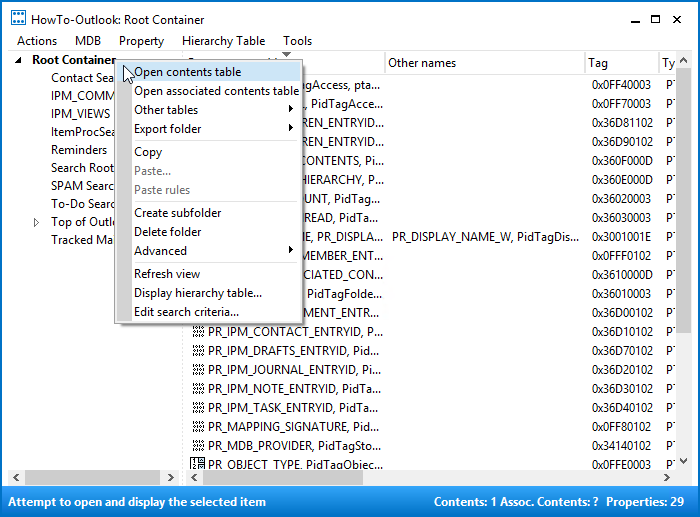
 - Right click on the top-level folder in the left panel and choose: Open contents table.
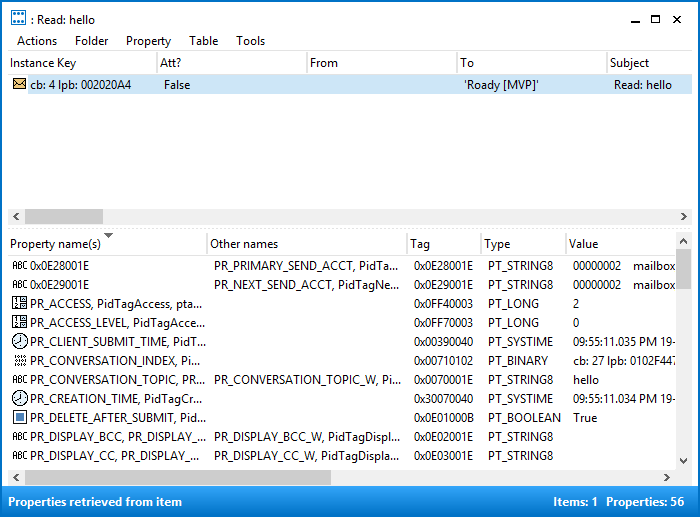
When you are using an Exchange account, this is called “Root – Mailbox” and otherwise it is called “Root Container”. - You should now see an item with a subject prefixed with the “Read:”.
- Select the message and choose: Actions-> Submit-> Abort submit…
- Make sure the message is still selected and choose: Actions-> Delete message
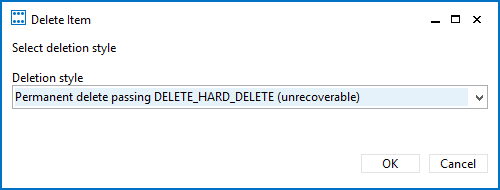
- Set the option to “Permanent delete passing DELETE_HARD_DELETE (unrecoverable)” and press OK.
- Repeat the abort and delete steps for each “Read:” message that is in the Root Container folder.
- Close all open windows of MFCMAPI.
 Double click on the line which has the value for the Default Store column set to True.